Discover
Workers choose roles and an area. Companies publish clear jobs or cover. Matching alerts bring relevant opportunities to opted-in workers.
Your next worker could be beyond your current team. Your next opportunity could be with a company you have not met yet. The Network service direction connects both sides and accepted work to agreements, schedules and records. NW Network is coming later. New paid access is closed at launch.
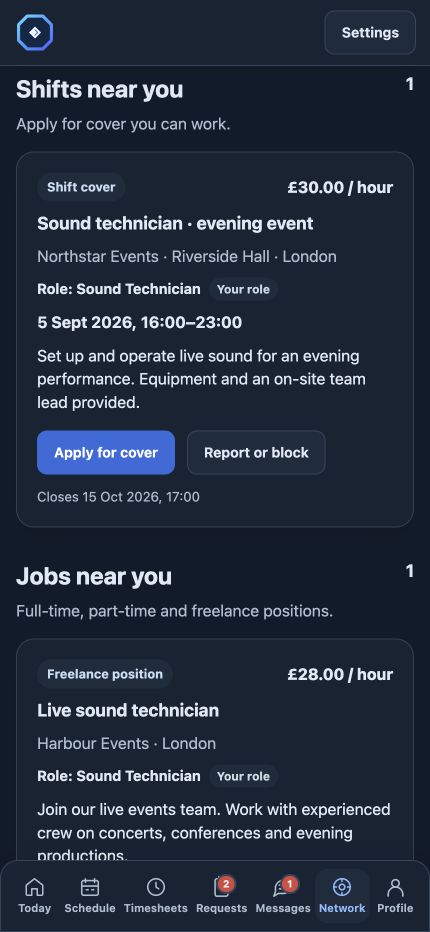
NW Network is coming later and is not included in any current plan or trial. The sections below illustrate its intended workflow. Today, your own workforce can already use requests, offers, schedules and work records through Native Workforce and the free team app.
Recruitment often ends where another system starts. NW Network sits alongside Native Workforce, so you can continue from a matching opportunity into the work itself.
Workers choose roles and an area. Companies publish clear jobs or cover. Matching alerts bring relevant opportunities to opted-in workers.
Applicants choose what to share. Companies review introductions, optional CVs and available profile evidence before deciding the next step.
When both sides agree, the worker joins the relevant workplace and accepted work appears alongside their other commitments.
Clocking, reviewed hours and work history continue in Native Workforce. There is no need to recreate the worker’s identity for each company.
Reach workers looking for your kind of opportunity, with role and area matching rather than an untargeted advert alone. The company still decides who is suitable.
Employees and freelancers keep one free worker profile across connected companies. Their opportunities, applications and accepted work live alongside each other, with private workplace details protected.
Your workforce and your recruitment can use the same roles, applications and working context.
Find someone for a specific gap, with the time, place and rate clear before they apply.
Reach workers who want a longer-term role that matches their interests and search area.
Connect with independent workers for flexible work, specialist roles and growing teams.
Your roles, your search area and your application. Companies cannot browse private worker profiles.
Get the team appSelect your roles, choose a search area and decide whether you are open to work. You can include related roles to discover close matches.
Opt into notifications for matching jobs and shift cover. Related-role alerts are a separate choice, so you control how broad the search becomes.
Add your introduction, roles, qualifications and optional CV. Choose what the company receives when you apply, including the available work-history details you have enabled for sharing.
Track your applications alongside your existing workplaces, schedule and work records. An application is your choice; it does not commit you to a shift.
This is the planned Network workflow. You can try Workforce or Operations today; Network is not included in those trials.
Try Workforce or OperationsAdvertise shift cover with the role, date, times, location and rate, so workers can decide whether the work fits.
Post full-time, part-time and freelance positions. Role and area matching brings the opportunity to workers looking for that kind of work.
Review the introduction, available profile information and CV the applicant chose to share before deciding whom to take on.
Manage applicants, close finished adverts and keep previous shift adverts in History. Remove adverts from that history view when you no longer need them there.
Workers choose whether to share their introduction, available profile details and CV. Companies see the information shared with their application, while personal calendar details and other workplace relationships remain private. Report or block controls help workers manage unwanted adverts and contact.
We plan to add ratings for companies and worker profiles as the Network grows, giving both sides more context when choosing who to work with. Ratings are not included in the current release.
NW Network is optional on Native Workforce Starter, Native Workforce Pro and Operations OS. It is not included in the new Operations OS base. NW Network is coming later and cannot be purchased at launch.
Indicative future price in GBP, excluding VAT. Network cannot be purchased or trialled yet; compare the three available plans below.
Enabled people, including accepted one-off cover and administrators, count once in that workplace. Applications and unaccepted invitations do not automatically activate anyone. Billing uses the highest concurrent enabled count in the subscription month.
Compare all three packagesYes. Workers can choose to show related roles as well as their selected roles, and separately opt into related-role alerts. They decide whether to apply; companies still check suitability and any required qualifications.
No. The company reviews the application and decides the next step. Accepted work follows the relevant offer or working-agreement process.
No. The worker profile and NW Network access are free for workers.
Yes. Download Operations OS for iPhone or iPad from the App Store, or for Android from Google Play. You can also use your free worker profile in the browser. Visit App & team access for both store links.
Operations OS records work, approved hours and supporting amounts. Employers and freelancers remain responsible for payroll, invoices and payments; approved records are not confirmation of payment.
Download Operations OS for iPhone, iPad or Android. Prefer a browser? Your free profile works there too.
 iPhone and iPad
 Android phones and tablets
Free for workers. No subscription, no card required. Use one account across your workplaces.